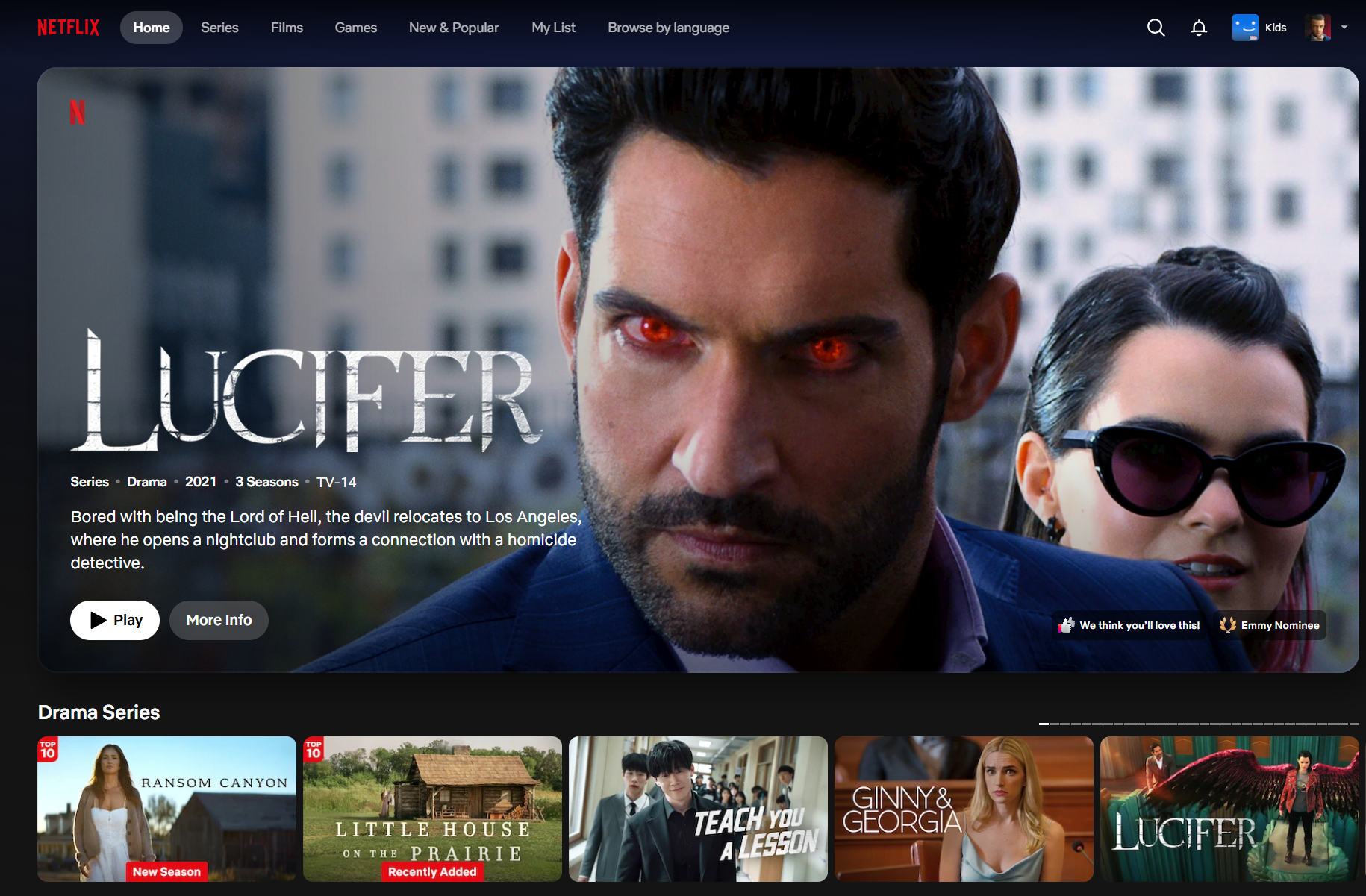
Close Menu
  • Home
  • Entertainment
  • Movies
  • TV Shows & Series
  • Hollywood
  • Celebrities
  • Netflix
  • Awards & Events

Subscribe to Updates

Get the latest creative news from FooBar about art, design and business.

What's Hot

‘Prima Facie’ TIFF premiere, Cynthia Erivo 2026 Oscar analysis

September 14, 2026

Seth Rogen Defends Selfie with Summer House’s West Wilson

September 14, 2026

Paramount & Netflix End Animated Film Agreement

September 14, 2026
Facebook X (Twitter) Instagram
Subscribe
Thegossipnews
Facebook X (Twitter) Instagram YouTube
  • Home
  • Entertainment
  • Movies
  • TV Shows & Series
  • Hollywood
  • Celebrities
  • Netflix
  • Awards & Events
Thegossipnews
Home»Netflix»Netflix Testing Out New TV Player Overhaul: Here What’s Changing
Netflix

Netflix Testing Out New TV Player Overhaul: Here What’s Changing

Williams MBy Williams MJuly 29, 2026No Comments4 Mins Read
Facebook Twitter Pinterest LinkedIn Reddit WhatsApp Email
Share
Facebook Twitter Pinterest Reddit WhatsApp Email


Picture Credit: Getty Images

Netflix is rolling out a brand-new test starting today (July 29th) for its TV application, tweaking the video player interface to make pausing, adjusting subtitles, and joining live events easier, with the hope of making the viewing experience more seamless.

Following up on the major TV homepage redesign unveiled last May—which focused on helping members easily find something great to watch—this new test focuses entirely on what happens after you hit play.

So, what exactly is being tested on your TV screens? Here’s a breakdown of the new features rolling out:

Streamlined Play/Pause Controls and Removed Back Button: In the early days, Netflix had to account for a wide range of input devices in its connected TV experience. Over time, however, smart TVs and streaming devices have converged and become much more streamlined, meaning most apps now behave similarly.

To that end, the on-screen play and pause buttons are being removed.

Of course, the ability to play and pause remains, but you’ll just use your device’s middle button or dedicated play/pause buttons on your remote—something you probably already do. Likewise, the on-screen back button, which historically sat in the top left of your screen, is also being removed, as most users already rely exclusively on their remote’s back button to return to the menu anyway.

Other Icons See a Shuffle: All the other icons you expect are here, but they have been consolidated down to the bottom-left side rather than split between the top-left, bottom-left, and bottom-right. ‘Skip Recap’ is the most prominent icon to make the move from the right side, while options like ‘Next Episode’ and additional settings now sit just above the main scrubber, which is notably a bit larger.

Unified Audio & Subtitles Menu: Tweaking your language settings is getting much less intrusive. Netflix has consolidated the audio language, subtitle, and subtitle-appearance controls into a single settings menu. The best part? The menu now appears as an overlay, meaning members can update their preferences in one view without pausing the movie or show they’re watching. This menu has also shifted to the bottom of the screen rather than pulling out from the right side.

Live Events Prompts: The smallest new update comes for live events. As Netflix pushes further into live programming (like their massive WWE deal), the player is adapting. When members click into a live event from the top carousel that is already underway, they’ll now be greeted with a clear, immediate choice: start from the very beginning, or jump straight to what’s happening live. This prompt replaces the old ‘More Info’ button.

Here’s some first looks at the test that’s rolling out to select users starting today:
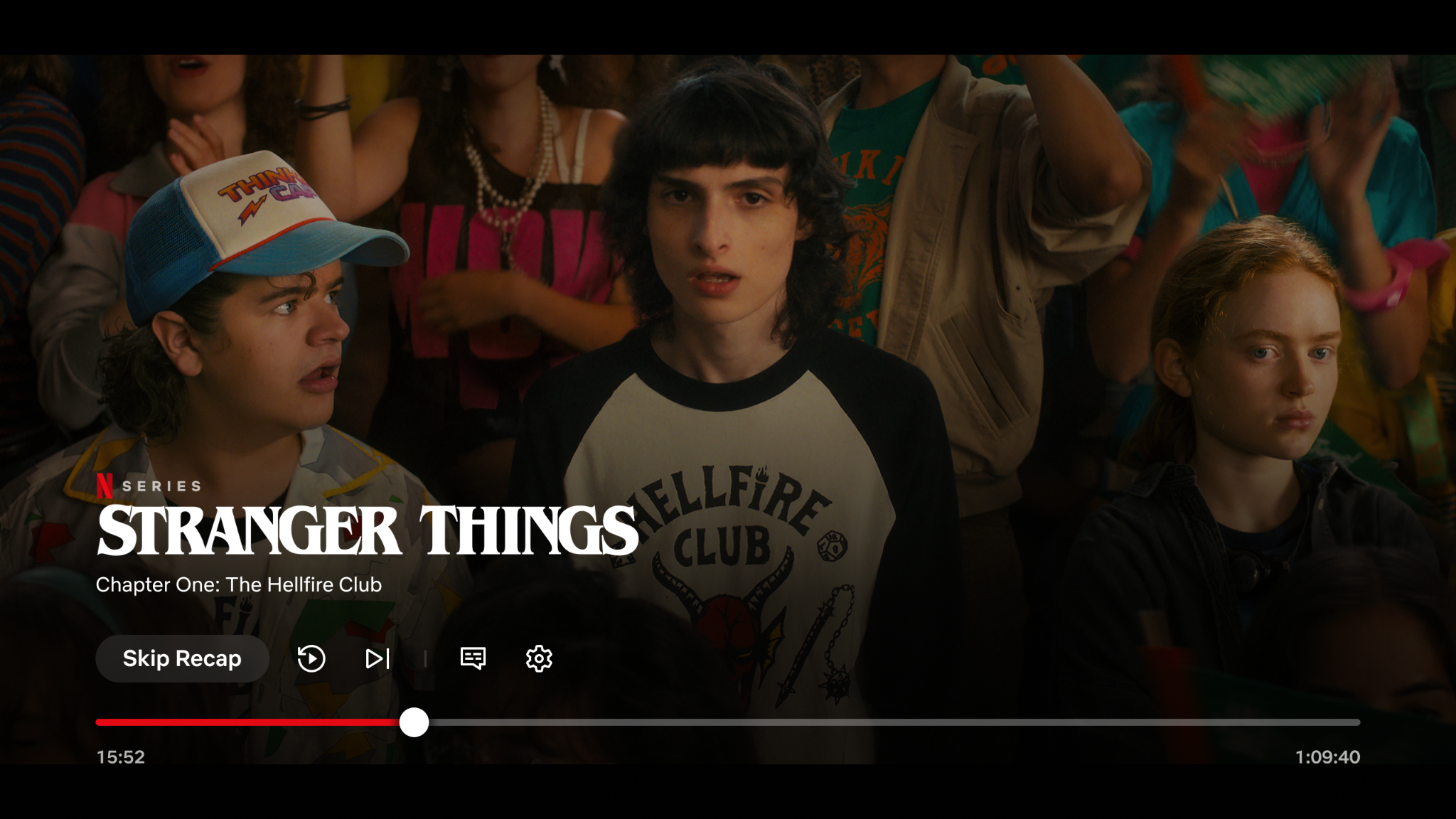
Repositioned Controls - Tv Player Test - 7 29 26Repositioned Controls - Tv Player Test - 7 29 26

The Updated Netflix UI Player on Connected Devices
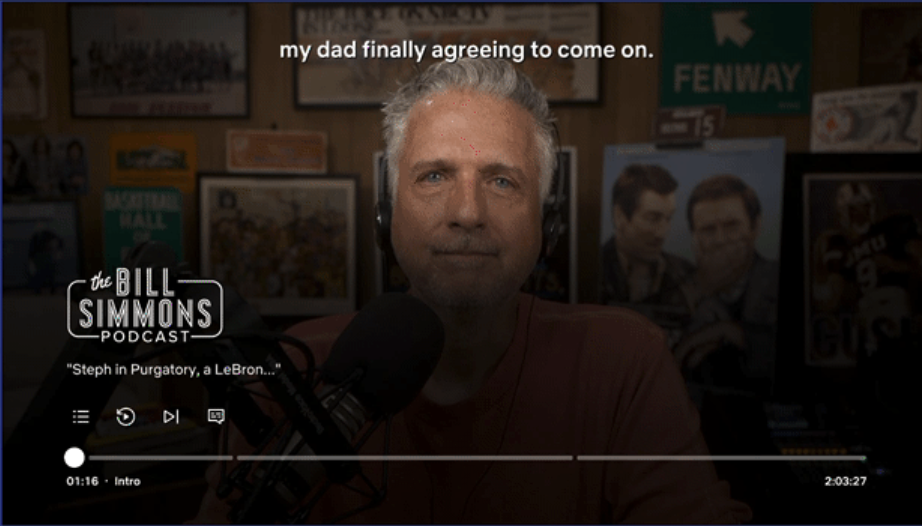
Player Chapters - Tv Player Test - 7 29 26Player Chapters - Tv Player Test - 7 29 26

The Updated Netflix UI Player For Podcasts With Chapters on Connected Devices
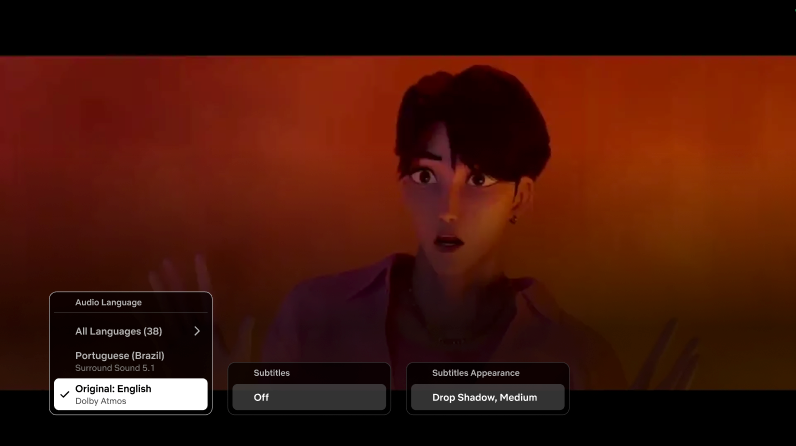
Audio &Amp; Subtitles Menu - Tv Player Test - 7 29 26Audio &Amp; Subtitles Menu - Tv Player Test - 7 29 26

Updated language options on Netflix’s New UI Player

Of course, Netflix running tests is by no means news; it has many ongoing at any given point. As we covered just last month, the streamer has introduced free trials for many international markets (excluding the UK/US) and is constantly testing design and feature iterations (with the occasional removal, too). Since we last covered the web user interface, it has also evolved, with menu items now spanning across the top of the page.

We should also mention that over the past week, Netflix has added new design elements to Games and Podcasts within the TV app, giving these categories a distinct white icon on a dark background in the top corner of the tile, rather than the red one previously used. The Top 10 icon on title cards has also shifted from the top-right to the top-left corner.

New Icons Podcast Games Netflix UiNew Icons Podcast Games Netflix Ui

New icons for Games and Podcasts

Web Ui ShiftsWeb Ui Shifts

The most recent update to Netflix’s change to its web user interface

These are all minor tweaks, but they add up over time. Given that this is a test, Netflix will collate the data and drive broader changes based on its findings.

Have you received the new video player UI on your smart TV or streaming device yet? Let us know what you think of the new controls in the comments below.

Share. Facebook Twitter Pinterest LinkedIn WhatsApp Reddit Email
Previous ArticleVince Gilligan roundtable with Rhea Seehorn, Bryan Cranston, Bob Odenkirk
Next Article Patti LuPone, Aaron Tveit, & More Make Surprise Appearance at ‘Les Mis’ Concert Event for Epic Curtain Call Performances
Williams M
  • Website

Related Posts

‘Demon Slayer: Kimetsu no Yaiba Infinity Castle’ Netflix Release Date Confirmed for September 2026

September 14, 2026

Is Breaking Bad as good as everyone says? Here are 4 reasons to finally stream the show

September 14, 2026

‘Empress of Flames’ Netflix Sets December 2026 Release Date for New Thai Historical Drama

September 14, 2026

33 Years Ago Today: Animaniacs First Premiered On Fox Kids – A Look Back On This Classic Show

September 14, 2026

Henry Cavill’s underrated Guy Ritchie war comedy charges onto Netflix this month

September 13, 2026

‘Tires’ Season 4 Gets Production and Netflix Release Date Update

September 13, 2026
Add A Comment
Leave A Reply Cancel Reply

Demo
Our Picks

Watching Wonder Woman 1984 with an HBO Max Free Trial?

January 13, 2021

Wonder Woman Vs. Supergirl: Who Would Win

January 13, 2021

PS Offering 10 More Games for Free, Including Horizon Zero

January 13, 2021

Can You Guess What Object Video Game Designers Find Hardest to Make?

January 13, 2021
  • Facebook
  • Twitter
  • Pinterest
  • Instagram
  • YouTube
  • Vimeo
Don't Miss
Awards & Events

‘Prima Facie’ TIFF premiere, Cynthia Erivo 2026 Oscar analysis

By Williams MSeptember 14, 2026

With the Land of Oz in the rearview, Cynthia Erivo is changing up her screen…

Seth Rogen Defends Selfie with Summer House’s West Wilson

September 14, 2026

Paramount & Netflix End Animated Film Agreement

September 14, 2026

When Will ‘Practical Magic 2’ Be Streaming? What We Know About the ‘Practical Magic 2’ Digital Release Date

September 14, 2026

Subscribe to Updates

Get the latest creative news from SmartMag about art & design.

Facebook X (Twitter) Instagram Pinterest
  • Contact Us
  • About Us
  • Privacy Policy
  • Terms and Conditions
  • Disclaimer
© 2026 All right reserved

Type above and press Enter to search. Press Esc to cancel.

Powered by
Necessary cookies enable essential site features like secure log-ins and consent preference adjustments. They do not store personal data.
None
Functional cookies support features like content sharing on social media, collecting feedback, and enabling third-party tools.
None
Analytical cookies track visitor interactions, providing insights on metrics like visitor count, bounce rate, and traffic sources.
None
Advertisement cookies deliver personalized ads based on your previous visits and analyze the effectiveness of ad campaigns.
None
Unclassified cookies are cookies that we are in the process of classifying, together with the providers of individual cookies.
None
Powered by